
Cart 0
The on-demand service industry has revolutionized the hiring process in everyday services. From house cleaning to plumbing, electrical, and furniture assembly to moving help, it’s easy to see that customers would rather not waste time looking for services, instead they prefer to book them through digital platforms. This increasing demand has created fantastic opportunities for entrepreneurs to act and start their own service marketplace business. A TaskRabbit Clone Script is a ready-made solution that could be useful to startup businesses and owners to construct a platform like TaskRabbit.
It connects customers with skilled service providers, streamlining the entire booking process from service discovery to payment. When you’re considering the on-demand services market with a high growth rate, it is advisable to understand how a TaskRabbit clone script functions to create a successful marketplace.
1. What is a TaskRabbit Clone Script?
A TaskRabbit clone script is ready-made service marketplace software that is tailored to copy the main features of TaskRabbit. It enables customers to locate and obtain the services of local providers at the same time.
It enables people to connect with local service providers for local jobs and enables local service providers to promote their skill set and make money using the web. The platform can be tailored to the specific needs of each business, its clients, and its services.
2. How Does a TaskRabbit Clone Script Work?
There are three main types of users on a TaskRabbit clone platform:
- Customers
- Service Providers
- Admin
Every user will have their own dashboard and functionality, which will help to streamline marketplace activities.
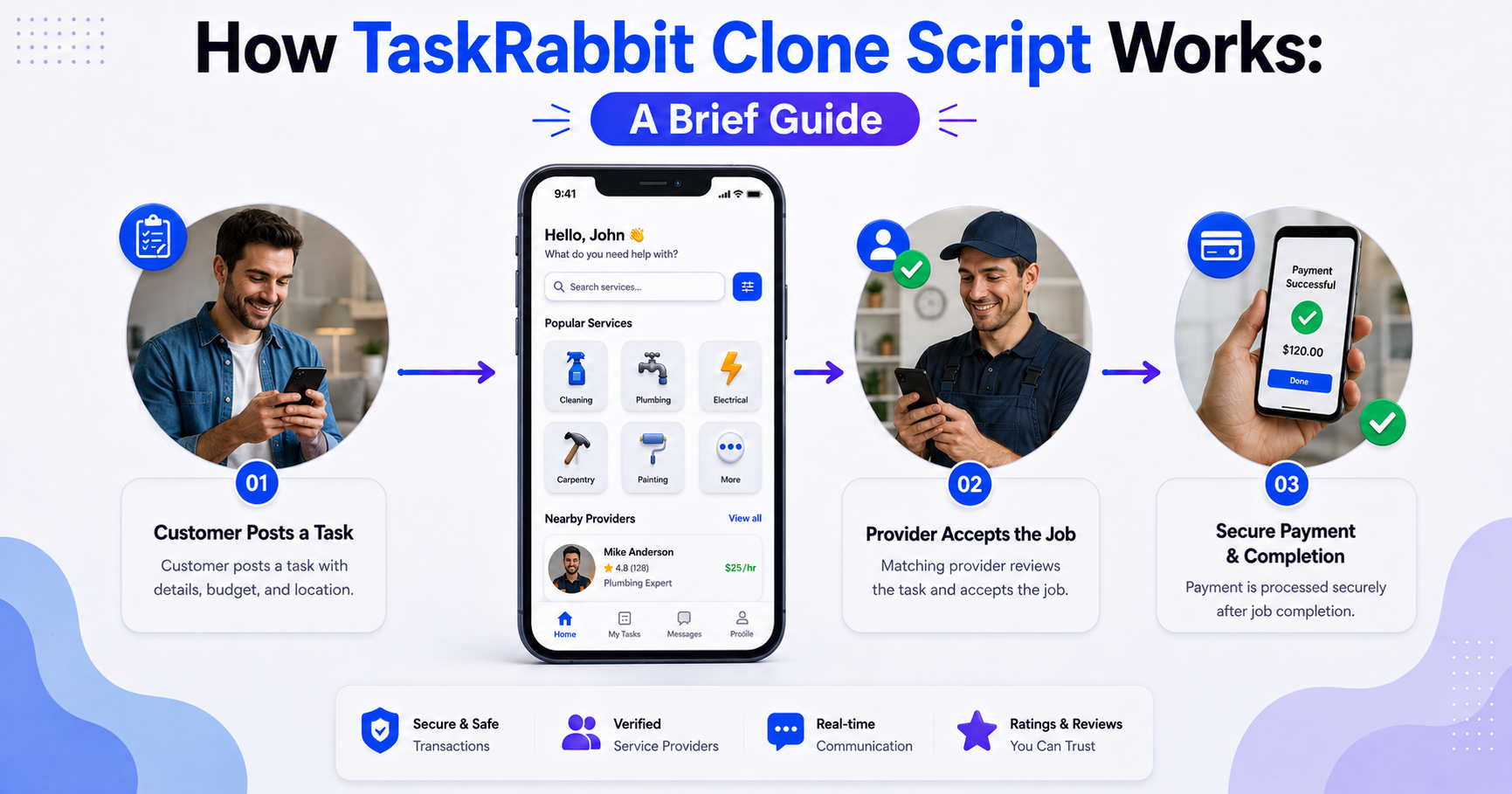
Customer Workflow
Registration and Login
Users sign up with their email or phone number, or their social media login. There is a simple registration process to make it easy for users to gain access to services.
Browse Service Categories
After registering, customers can check out several different types of services, including:
- House Cleaning
- Plumbing Services
- Electrical Repairs
- Gardening
- Handyman Services
- Moving Assistance
- Appliance Repair
This platform enables users to look up services according to their location and requirements.
Select a Service Provider
You must choose a service provider.
Customers can see the differences between service providers by looking at:
- Ratings and reviews
- Pricing information
- Service experience
- Availability
This transparency facilitates users selecting the most appropriate professional for them.
Schedule a Service
Once customers have picked a provider, they can opt for their preferred date and time, enter the details of their task and submit their booking request.
Payment and Feedback
When successfully accomplished, customers are able to release payment from the system, and give ratings and reviews. In case of any problems, they have the capacity to submit a grievance that will be considered by administration.
Service Provider Workflow
The service providers (also referred to as taskers) are also an important part of the marketplace ecosystem.
Register and Profile Registration Form
Providers sign up to the platform and build their professional profiles, showcasing their areas of expertise, experience, and services provided.
Create a Service Listing
Taskers can create their very own service shop by including:
- Service descriptions
- Pricing details
- Service areas
- Portfolio images
This will help to draw new customers.
Receive Booking Requests
When customers request service, correspondents for the providers are notified. They have the ability to see the request and then approve or reject it.
Complete the Task
If accepted, the provider carries out the requested tasks and updates the status of the task via the platform.
Receive Earnings
If students complete a successful course, their payments are deposited to the provider’s wallet. They then have the ability to withdraw the amount of money they’ve won to supported payment avenues like bank accounts or PayPal.
Admin Workflow
The admin panel is the key to the marketplace, as it controls the overall operation of the platform.
Administrators can:
Handle customers and service providers. Handle customers and service providers.
- Monitor bookings
- Handle disputes
- Allow service provider shops to be approved
- Record payments and commissions
- Generate reports and analytics
By completing bookings the admin also gets paid a commission.
3. Key Features of a TaskRabbit Clone Script
For a successful service marketplace, it is essential to have strong features, such as those that improve user experience and platform efficiency.
Multi-Vendor Support
It is a platform that enables multiple services and service providers to register and offer services at the same time as a shop.
Multiple Payment Gateways
Secure payment methods like Paypal, Stripe and other payment gateways are available to users to make payments.
Wallet System
There is a secure wallet for both the customers and service providers to manage their funds and carry out safe transactions.
Ratings and Reviews
The review system allows for building trust and giving customers a means of determining superior service providers.
Dispute Management
An integrated dispute resolution system allows administrators to fairly and efficiently manage disputes.
Mobile-Friendly Design
Optimized for both tablet and desktop, users can access the platform from any device.
Commission Management
Commissions and payments are automatically calculated and distributed based on pre-defined policies.
Unlock Your On-Demand Potential With Our TaskRabbit Clone Script Today!
4. Why Choose a Migrateshop TaskRabbit Clone Script?
Migrateshop’s TaskRabbit clone script will be the can be costly and end up taking a long time to get a service marketplace off the ground. There are several benefits to a TaskRabbit clone script:
- Faster deployment
- Reduced development costs
- Proven business model
- Easy customization
- Scalable architecture
- Multiple revenue opportunities
Entrepreneurs can concentrate on expanding their business and not on spending months developing software.
As you embark on your journey to launch your own on-demand services marketplace, keep in mind that success hinges on user trust, efficient processes, and continuous innovation.
5. Conclusion
In conclusion, a TaskRabbit clone script provides everything you need to launch an on-demand service marketplace. From the user’s perspective, the platform simplifies service marketplace usage, starting with customer enrollment and service booking through to provider management and secure payments.
Investing in a TaskRabbit clone solution can be a good business decision as the demand for local and on-demand services is growing. By leveraging the right features, smooth user experience, and management tools, you can create a thriving marketplace that connects buyers with skilled professionals and ensures steady income.
As you embark on your journey to launch your own on-demand services marketplace, keep in mind that success hinges on user trust, efficient processes, and continuous innovation.
FAQ's
1. What is a TaskRabbit Clone Script?
A TaskRabbit Clone Script is a pre-built on-demand marketplace solution that helps you launch a platform where users can hire service providers for everyday tasks like cleaning, repairs, moving, and delivery.
2. What features does it offer?
It usually includes user registration, task posting, service provider profiles, booking management, secure payment gateways, in-app chat, ratings & reviews, and an admin control panel.
3. Can I customize the platform?
Yes, most clone scripts are highly customizable. You can modify UI/UX, add or remove service categories, integrate APIs, and adjust workflows based on your business model.
4. Is it suitable for scaling my business?
Yes, a well-built clone script is designed with scalable architecture, allowing you to handle increasing users, service providers, and transactions as your platform grows.
5. How does monetization work in a TaskRabbit Clone Script?

You may also like

Flat 60% OFF on Fiscal Year End SALE 2023 at Migrateshop
Flat 60% OFF on Fiscal Year End SALE 2023 at Migrateshop
It is that time of the year again! Get ready for Migrateshop’s Fiscal Year End…

50% Off on Valentine’s Day Sale 2023 at Migrateshop
50% Off on Valentine’s Day Sale 2023 at Migrateshop
As an entrepreneur valentines day is also a great opportunity to show appreciation to their…

10+ Best website clone scripts to bring up your startup
10+ Best website clone scripts to bring up your startup
Website clone scripts are pre-built pieces of code that allow users to quickly and easily...